
SlowBooks Switchboard
What it is
SlowBooks Switchboard lets Claude work your SlowBooks Pro books: look things up, run reports, and enter the daily books. It is a small program of its own, sbplive, separate from SlowBooks Pro. It runs on your own computer: Claude starts it there and talks to it there.
Switchboard reaches SlowBooks Pro through the app's own API, with an API token you make. It does only what that token's role allows. Every change Claude makes is in SlowBooks Pro's audit log under the token's label, as token:<label>.
Switchboard holds no books, and it sends nothing anywhere but your own SlowBooks Pro. Nothing passes through the SlowBooks relay. What Claude reads from the books goes to Claude, as with any assistant.
Switchboard is free, under the Apache License 2.0.
Which way to connect
There are three ways for an AI assistant to work your SlowBooks Pro books. Start with the first one unless you have a reason not to.
Connect to AI assistant
The easy way. One button in SlowBooks Pro 2.32.0 or later.
- What you install
- Nothing. The button is in Settings → Connections, under AI assistants.
- Which assistants
- Claude (on the web, the desktop or a phone) and Grok.
- What it passes through
- The free SlowBooks relay. SlowBooks Pro dials out to it.
- Who it suits
- Most people. You press a button, add an address in the assistant, and type a code.
SlowBooks Switchboard
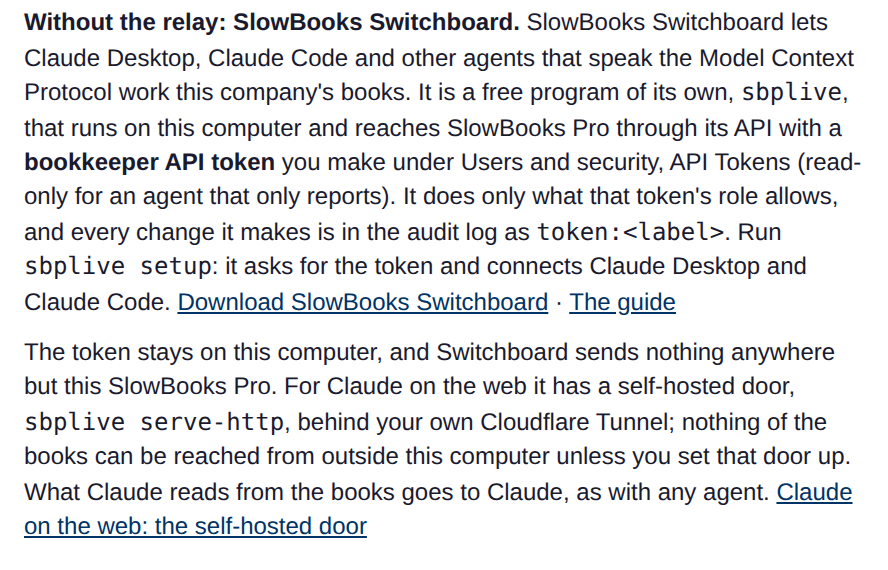
A small program on your own computer. No relay.
- What you install
- One program,
sbplive, on the computer where you use Claude. - Which assistants
- Claude Desktop and Claude Code. Other programs that speak the Model Context Protocol can use it too.
- What it passes through
- Nothing in between. Switchboard talks to your own SlowBooks Pro and to nothing else.
- Who it suits
- Someone who would rather nothing passed through the relay, and who does not mind typing a command in a terminal.
This page. Start with what you need
The API directly
Your own agent calls SlowBooks Pro's API.
- What you install
- Nothing from us. You bring the agent.
- Which assistants
- Any agent that speaks HTTP, such as Claude Code, Grok, Codex CLI or Gemini CLI.
- What it passes through
- Nothing in between. The agent calls the API on your computer or your own server.
- Who it suits
- People who already work with an agent in a terminal, or who write their own scripts.
All three work through an API token with a role, and with all three every change is in the audit log as token:<label>.
What you need
- SlowBooks Pro, open on your computer, or running as the office's Server Edition. Switchboard 1.1.0 goes with SlowBooks Pro 2.32.0, which is in beta: see the beta page.
- An administrator's sign-in to SlowBooks Pro, to make the API token.
- Claude Desktop or Claude Code on the computer where Switchboard will run.
- A computer the downloads are made for: Windows, a Mac with Apple silicon, or Linux on x86-64. On another computer, Switchboard runs from source with Python 3.10 or newer.
Get it
The downloads are on Switchboard's release page on GitHub. Take the one for your computer, and the small checksum file that goes with it. For version 1.1.0 they are:
| Computer | Download | Checksum file |
|---|---|---|
| Windows | sbplive-1.1.0-windows-x64.zip | SHA256SUMS.windows |
| Mac (Apple silicon) | sbplive-1.1.0-macos-arm64.zip | SHA256SUMS.macos |
| Linux (x86-64) | sbplive-1.1.0-linux-x86_64.tar.gz | SHA256SUMS.linux |
The Windows program is signed. The Mac program is signed and notarized.
Check the download
The checksum file lets you see that the download arrived whole and unchanged. Put it in the same folder as the download, open a terminal in that folder, and run the line for your computer.
On Linux:
sha256sum -c SHA256SUMS.linuxOn a Mac:
shasum -a 256 -c SHA256SUMS.macosEach one answers with the download's name and OK.
On Windows, in PowerShell:
Get-FileHash sbplive-1.1.0-windows-x64.zipCompare the long value it prints with the one in SHA256SUMS.windows (open it in Notepad). They should be the same. Capital letters or small ones make no difference.
Put it where it will stay
Unpack the download. Inside are the program, sbplive (sbplive.exe on Windows), its license, a notice and a readme. On Linux they are in a folder named sbplive-1.1.0. Put the program in a folder where it will stay before you run setup: setup tells Claude where the program is. If you move it later, run setup again.
To run it, open a terminal in the folder where you put the program. Where this page says sbplive, type ./sbplive on a Mac or Linux, and .\sbplive.exe on Windows.
Or from source
With Python 3.10 or newer, this installs it and puts sbplive on your path:
pipx install git+https://github.com/VonHoltenCodes/SlowBooks-SwitchboardSet it up
Four steps: make a token in SlowBooks Pro, run setup, restart Claude Desktop, and ask Claude a question. The screens and the program's words below are from a made-up company, Copperline Woodworks. Its customers are made up too.
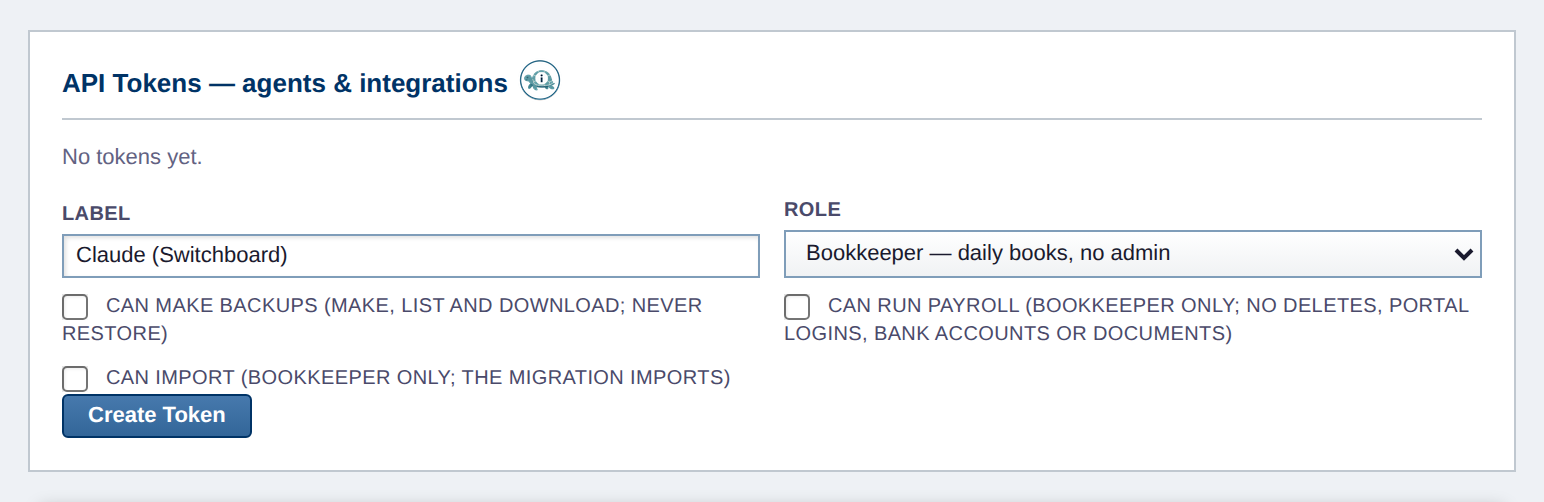
1. In SlowBooks Pro: make the API token
- Signed in as an administrator, open Settings → Users and security and find API Tokens.
- Type a label you will recognize. It names every change Claude makes in the audit log.
- Choose the role. Bookkeeper is the usual choice. Choose Read-only if Claude should only look and report.
- Press Create Token, and copy the token. It starts with
sbp_, and it is shown once.
2. Run sbplive setup
sbplive setupSetup asks where the books are and asks for the token. It checks the token against SlowBooks Pro and stores it for your user only. Then it offers to connect Claude Desktop and Claude Code. This is what it prints:
SlowBooks Switchboard setup
Where are the books? Press Enter for this computer (http://127.0.0.1:3001), or type the address of the office's SlowBooks Pro server:
Paste the API token from SlowBooks Pro, Settings, API Tokens (it starts with sbp_ and is not shown as you type):
SlowBooks Pro answered at http://127.0.0.1:3001: the company is Copperline Woodworks (SlowBooks Pro 2.32.0), and the token works as a bookkeeper (the daily books but not settings or payroll).
The token is stored in /home/you/.config/sbplive/token, which only you can read.
Connect Claude Desktop (/home/you/.config/Claude/claude_desktop_config.json)? [Y/n]
Claude Desktop is connected. The file as it was is saved as /home/you/.config/Claude/claude_desktop_config.json.bak-sbplive-20261121-010744. Quit Claude Desktop completely and open it again to see SlowBooks among its tools.
Connect Claude Code for your user? [Y/n]
Claude Code is connected for your user, in every project.
Done. To check it later, run: sbplive status. To take SlowBooks out of Claude: sbplive disconnect.- Where are the books? Press Enter if SlowBooks Pro is on this computer. For the office's Server Edition, type its address, such as
http://192.168.1.20:3001orhttps://books.example.com. A plainhttp://address is accepted only on your own network, and setup says that the token travels unencrypted there. Use thehttps://address if the server has one. - The token is not shown as you paste it. Paste it and press Enter.
- Claude Desktop's own file, if it has one, is saved as it was before setup changes it, and setup changes nothing in it but its own entry. If there was no file yet, setup says it created one. That entry names the program, never the token.
- The folders in the sample are a Linux computer's. Yours will differ.
To set it up with no questions, give the address and a file that holds the token. The token is never typed on the command line itself.
sbplive setup --yes --url https://books.example.com --token-file token.txt3. Restart Claude Desktop
Quit Claude Desktop completely, not only its window, and open it again. SlowBooks is then among its tools.
4. Ask Claude which company it is connected to
Ask: “What company are you connected to?” Claude asks Switchboard, and Switchboard answers with the company's name, the version of SlowBooks Pro and the token's role. Claude then tells you in its own words. For the made-up company, what Switchboard hands Claude includes these lines:
"company": "Copperline Woodworks",
"app_version": "2.32.0",
"token_role": "bookkeeper",
"token_role_means": "The API token works as a bookkeeper (the daily books but not settings or payroll)."
What Claude can do
Whatever the token's role allows a person with that role, and nothing more.
| Role | What it may do |
|---|---|
| Read-only | Read the books and run reports. Change nothing. |
| Bookkeeper | The daily books: customers, vendors, items, invoices, bills, expenses, journal entries, payments received and bills paid, and voids. Not settings, users, payroll or HR. |
| Accountant | Read everything except payroll, HR and employees, and post journal entries. |
SlowBooks Pro decides every request, as it does for a person: the role, the closing date and every rule of the app. When it refuses, Claude hears why in a sentence and tells you. No API token can manage users or tokens, restore a backup, or change settings or the company file.
A create with little on it is asked about first. When Claude tries to create a customer, vendor, item, employee, account, invoice, bill, expense, estimate or purchase order with only what SlowBooks Pro requires, nothing is written. Claude is told which fields are empty and to ask you about them. When a new customer is sent with a name and nothing else, this is what Switchboard tells Claude:
Nothing was created yet: a customer with this little on it may need checking first. Ask the user whether they have any of these: Company, Email, Phone, Billing address, Terms, Sales Tax (taxable or exempt). Do not make any up. Then call create_customer again with what they gave and asked_user: true, or with asked_user: true alone if they want it created as it is.The answer says what was left blank. After a create, Claude hears two lists, so it can tell you: the fields that are still empty, and the ones it did not give that SlowBooks Pro filled with its own default. When the same customer was sent again with a company, an email, a phone and an address, it was created, nothing was left blank, and the answer listed two defaults: Terms “Net 30” and Sales Tax “taxable”.
Payments are booked once. Each payment carries a key. A payment Claude sends again after a lost answer, with the same key, is not booked a second time.
Voids leave a trail. Claude can void an invoice, bill, expense, journal entry, payment or bill payment. A void leaves a reversing entry; the voided record is not deleted. Claude can also delete a record where SlowBooks Pro allows it; a customer, vendor or item with history is made inactive instead.
Claude can ask you first. Every change is marked so that Claude Desktop and Claude Code can ask you before it runs.
A few things are left to SlowBooks Pro itself: PDFs, CSV and IIF files, print pages and uploads. Open those in the app.
In the audit log
Everything Claude changes is in SlowBooks Pro's audit log under token: and the label you gave the token. These rows are a customer added and a $500.00 payment received through Switchboard, both under the token labeled Claude (Switchboard).

token:Claude (Switchboard). The row under it is one the administrator added. Both customers are invented.
Assistants make mistakes. Review what Claude entered.
Check on it, and turn it off
Check on it
sbplive status says whether SlowBooks Pro answers, which company and version, the token's role, whether Claude Desktop and Claude Code are connected, and where the log is:
SlowBooks Switchboard is set up for http://127.0.0.1:3001.
SlowBooks Pro answered at http://127.0.0.1:3001: the company is Copperline Woodworks (SlowBooks Pro 2.32.0), and the token works as a bookkeeper (the daily books but not settings or payroll).
Claude Desktop is connected (/home/you/.config/Claude/claude_desktop_config.json).
Claude Code is connected for your user.
The log is at /home/you/.config/sbplive/sbplive.log.
The log never holds the token or what was sent.
Turn it off
- For a while: quit Claude, or turn SlowBooks off in Claude's own list of connectors. Nothing runs when Claude is not using it.
- Take it out of Claude: run
sbplive disconnect. It takes Switchboard out of Claude Desktop, saving the file first, and out of Claude Code. - Delete the stored token too: run
sbplive disconnect --forget. - Lock it out for good: revoke the token in SlowBooks Pro, under Settings → Users and security → API Tokens. That works even if the token was copied somewhere: SlowBooks Pro refuses it from then on.
sbplive disconnect prints:
SlowBooks was taken out of Claude Desktop. The file as it was is saved as /home/you/.config/Claude/claude_desktop_config.json.bak-sbplive-20261121-010953. Quit Claude Desktop and open it again.
SlowBooks was taken out of Claude Code.
With --forget, it adds:
The stored token was deleted. It still works in SlowBooks Pro until it is revoked there, under Settings, API Tokens.From outside the office
Switchboard can also serve Claude on the web and the Claude apps, with sbplive serve-http behind your own Cloudflare Tunnel. Nothing is opened on the office's router, and the API token never leaves the computer. Switchboard itself opens nothing to the outside unless you set this up.
It takes more setting up than this page covers. The step-by-step guide is docs/REMOTE.md on GitHub.
The whole guide, and support
The whole guide is docs/GUIDE.md on GitHub. It has every tool, where things are kept on each kind of computer, and what to do when something is wrong.
To tell us what goes wrong, email support@slowbookspro.com, or open an issue on the Switchboard repository. Say what sbplive status prints. Never send an API token. If you found a security problem, email it; do not put it in a public issue.
Would you rather press one button? Connect to AI assistant is built into SlowBooks Pro 2.32.0 or later.