Docs Security and admin
Accessibility
SlowBooks Pro is built to be usable by everyone, including people who rely on screen readers, keyboards, or high-contrast displays. We strive to conform to WCAG 2.1 Level AA. We do not claim compliance — no certifying body issues one — but we test against it, fix what we find, and treat a barrier as a bug.
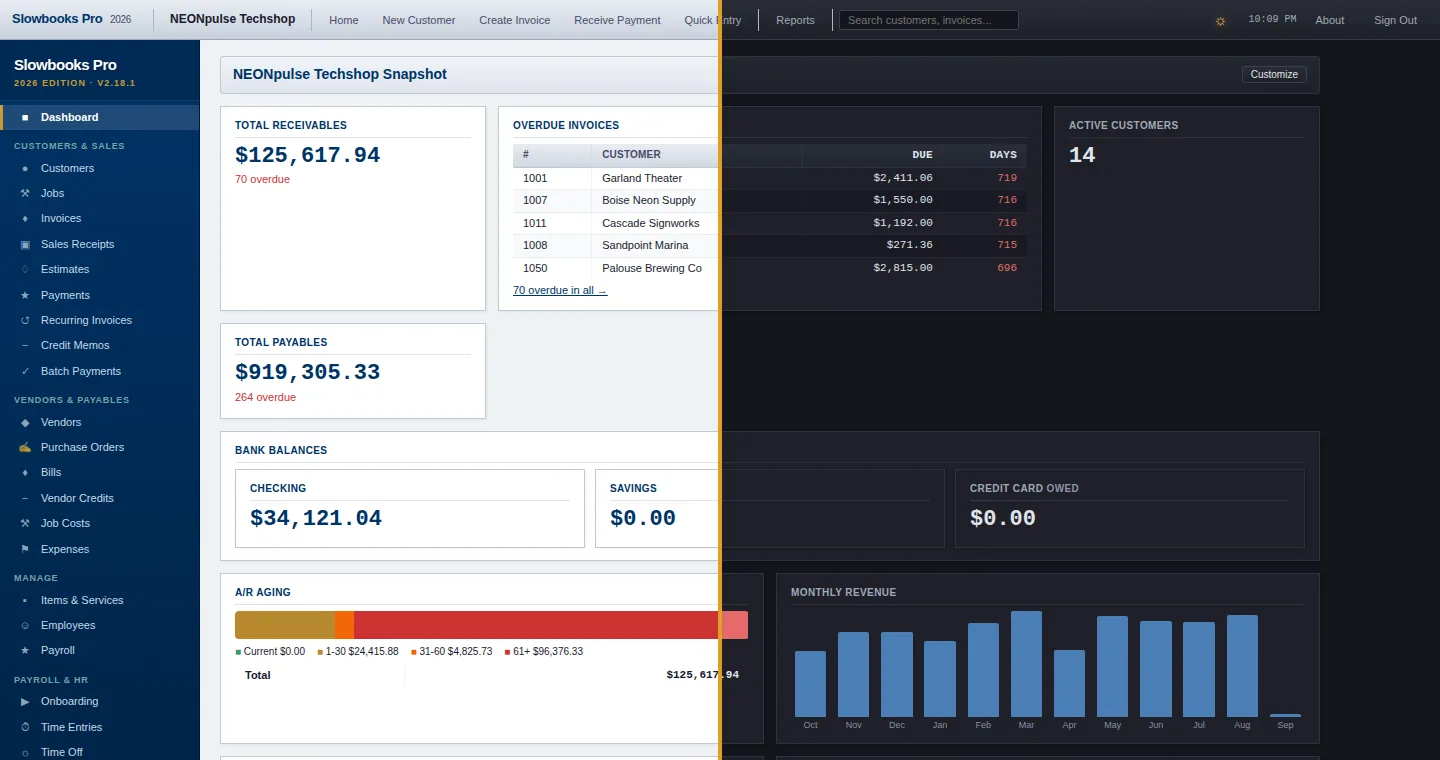
The same screen in both themes. Switch with the theme button in the toolbar, or Alt+D.
What is in place (v2.31)
Contrast, in both themes
- Text meets WCAG AA contrast (4.5:1, or 3:1 for large text: 24px, or 18.66px bold) in the light and the dark theme everywhere it is drawn: every page and dialog, the sign-in and setup screens, pop-up messages and the PDF window. Semi-transparent text is measured as it is painted. (v2.18.0)
- Chart lines, bars and colour keys meet 3:1 (WCAG 1.4.11), so the A/R aging colours can be told apart in both themes. (v2.18.0)
- How it's checked:
tests/test_theme_contrast.py,tests/test_dialog_contrast.pyandtests/test_css_hidden_and_contrast.pyopen every page, notice and dialog in Chromium in both themes and measure the colours actually painted. They run with the suite before each release (they skip where playwright's Chromium isn't installed), and the macOS release gate carries its own contrast rules.
Screen readers and keyboards
The pickers search as you type (v2.19.0): each is a WAI-ARIA 1.2 combobox, so a screen reader hears its name, how many names match as you type, and the highlighted one. The arrow keys move through the list, Enter or Tab takes a name, and Escape backs out.
Every form field has a name a screen reader can say (v2.18.2, #198): a form's label is tied to its field (clicking the label puts the cursor in the field), a required field is read as required rather than as "star", a field in a grid of inputs is named from its column and row ("Jan, 6500 Rent or Lease"), a checkbox that starts a row says what ticking it does ("Pay invoice 1001"), and a field with only a placeholder, like a search box, takes it as its name (VoiceOver reads it that way too). Fields with the same label in different parts of a screen sit in groups named after their headings (Billing Address, Shipping Address).
tests/test_field_names.pysweeps every page and dialog, a nonprofit's included, for a field without a name (2.18.1 had about 1,100) and for two fields a screen reader couldn't tell apart.Every PDF the app generates is tagged (PDF/UA-1) and declares its language and title — invoices, statements, estimates, pay stubs, W-2s, 1099s, Forms 940/941, checks, reports — so screen readers receive headings, tables and reading order rather than a flat image of text.
Dialogs are real dialogs: focus moves into them, Tab and Shift+Tab stay inside, Escape closes them, and focus returns to the control that opened them. Tab reaches every control, buttons and links included, on every browser and whatever the Mac's "keyboard navigation" setting: the dialog moves focus itself, in the order the browser would (v2.22.0). On a page, outside a dialog, the Mac's setting applies: with Keyboard navigation off, as macOS ships, plain Tab moves between text fields and lists only, and Option+Tab — or Keyboard navigation turned on in System Settings → Keyboard — reaches links and buttons too. Escape in a date field leaves the field (after closing its calendar); the next Escape closes the dialog, so an unsaved form is not lost to one key (v2.22.0). No dialog opens with focus on Void or Delete: one whose first control is destructive takes focus itself, and reads its title (v2.22.0).
The keyboard's place is visible (v2.22.0): every link, button, checkbox and radio, and whatever else the keyboard reaches, draws a gold ring when it takes focus from the keyboard, in both themes, so Tab can be followed through a report's rows as well as its buttons. The gold has a halo of the theme's own ground on both its sides (white in the light theme, the page's dark in the dark), so it stands 3:1 against what it meets wherever it is — the toolbar's grey, a dialog's blue title bar, the lines and the table header around a link in running text — measured as the browser paints it (
tests/test_browser_keyboard.py); on the toolbar the light theme's gold is a deeper one, which clears the bar's grey by itself too. A mouse click on a button or a link draws none. A field keeps its own focus style (the blue border and pale ground), and a dialog that takes focus itself is not outlined. The skip link, Tab's first stop, moves focus to the page's content and leaves the page where it is.Back, within the app (v2.22.0): the toolbar's bordered gold ← Back button goes back through the app's history, and is lit only while an app page is behind (muted and borderless otherwise, so the two states cannot be mistaken). The desktop app's window has no Back of its own, and some hops (a report's row to a customer's page, a class's page to its P&L) have no "Back to …" button; this covers them all. The Report Center's cards are links: Tab reaches each, Enter (or Space) opens its report, and Back returns to the Report Center with focus on the card.
Notifications ("Invoice saved") announce through a polite live region.
Sortable lists say how they are sorted (v2.31.1): a column heading that sorts a list (the Invoices list, among others) is a button, and the sort is announced (
aria-sort).The window zooms (v2.30.0): Ctrl and + or −, Ctrl+0 to reset, or Ctrl and the mouse wheel (⌘ on a Mac) scale the whole desktop window, and the level is kept between launches. A text-size setting that leaves the sidebar alone is still to come.
A sound when a transaction posts, optional and per sign-in (v2.29.1): Settings → Sounds. Off by default.
Enter moves between fields on request (v2.29.1): Settings → My Preferences, for people used to the way desktop bookkeeping software has always done it.
The top bar names its shortcuts (v2.31.1): Home (Alt+H) and the rest read their keys to a screen reader and on hover.
A long problem list is one Tab stop (v2.31.2): the QuickBooks import's list of problems to tick is walked with the arrow keys, and the keyboard's ring follows, on Windows and on a Mac.
Every data table declares its column headers (
scope="col").Icon-only buttons (remove a line, delete an attachment, close a dialog) carry accessible names.
State is never conveyed by colour alone: an invoice reads Paid, Draft or Sent; a reconciliation reads "Balanced" or "Out of balance".
Landmarks and skip links where the forms are long (v2.22.2): the invoice, bill and journal-entry forms are form landmarks named by the dialog's title, and each opens with "Skip to the line items" ("Skip to the lines" on the journal form) as its first stop — a screen reader hears it first, Shift+Tab from the first field reaches it, and it lands the keyboard on the first line's first box with the ring showing — so the lines are one press away, not forty tabs past the address block. The dialog still opens on its first field, never on Void or Delete. The chart of accounts is a navigation landmark (its names open the registers) with "Skip to the account filter" as its first stop.
Every bar, slice and point carries its figure (v2.22.2): on the dashboard's and Analytics' charts the amount is written on or beside the mark — past a bar's end (inside it when the chart has no room), in a slice (one under 4% is too thin to hold it), above a line's point — so the colour is not the only way from a mark to its amount. A label that would land on another is left off; the table under each chart has every figure. The dashboard's aging bar and monthly revenue bars say theirs too.
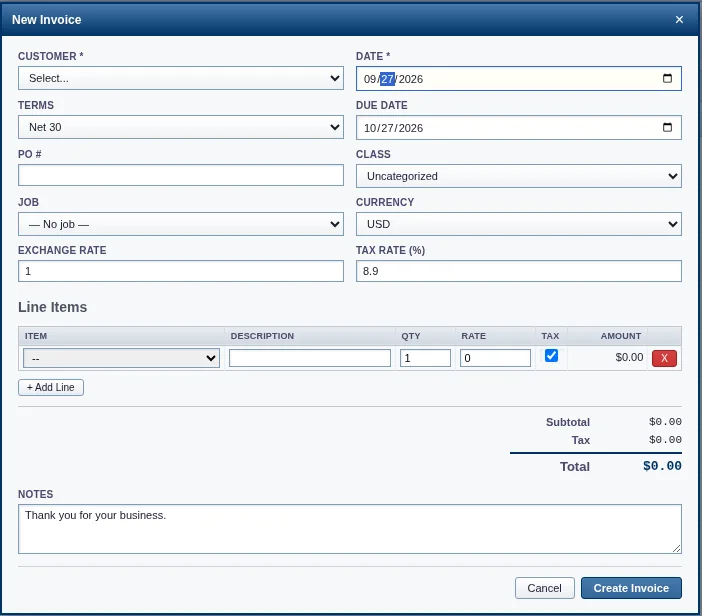
New Invoice: focus is inside the dialog and moves from field to field with Tab.
Keyboard shortcuts
| Keys | Does |
|---|---|
| Alt+← (⌘[ on a Mac) | Back, within the app |
| Alt+N | New invoice |
| Alt+P | Receive payment |
| Alt+B | Enter a bill (v2.22.2) |
| Alt+E | Enter an expense (v2.22.2) |
| Alt+Q | Quick Entry |
| Alt+H | Dashboard |
| Alt+D | Toggle dark mode |
Ctrl+K (⌘K on a Mac), or / outside a field | Search |
| Ctrl+S | Save the open form |
| Ctrl+Enter | Submit Quick Entry |
| Escape | Close the dialog (in a date field: leave the field first) |
On a Mac the Alt key is Option; the letter shortcuts go by the key, not the character Option types, so Option-D toggles the theme even though it types "∂" (v2.22.0). While you are typing in a field — a box, a notes area, a list — no Alt letter is a shortcut, on any computer; and over a form you are filling in, Alt+N, P, Q, B, E and H do nothing from any of its controls (Save, the ×, a button, a link), so a half-typed bill stays until you save or close it — Alt+D, the theme, still works there (v2.22.0). Over a report or a customer's page, and from any page, the six work as the table says. Ctrl+K (⌘K) finds from anywhere, the search box included. The toolbar button each one stands for carries the shortcut: the hover reads "Enter Bill (Alt+B)" — "(⌥B)" on a Mac — and a screen reader hears it (v2.22.2).
What we know is still open
- Keyboard ordering is offered everywhere a mouse drag exists: document lines have Move line up, Move line down and Insert line below beside the drag handle (v2.31.0), and the dashboard's cards use arrow buttons. What is still open is a text-size setting of the app's own; the window zoom above is the way to larger text today.
Tell us
If something in SlowBooks Pro is hard or impossible for you to use, open an issue at https://github.com/VonHoltenCodes/SlowBooks-Pro-2026/issues or email support@slowbookspro.com and say which screen and which assistive technology. Barriers are triaged as bugs.
The same statement, with more screenshots, is on the website: https://www.slowbookspro.com/accessibility/